
Settings — Managed Lists
The Settings ▸ Managed Lists page is where every dropdown in the HR-flavored parts of the portal gets its values. Hardware types, employment types, credential types, salary bands, matter types, practice areas — all configurable here so each tenant can model its own taxonomies.
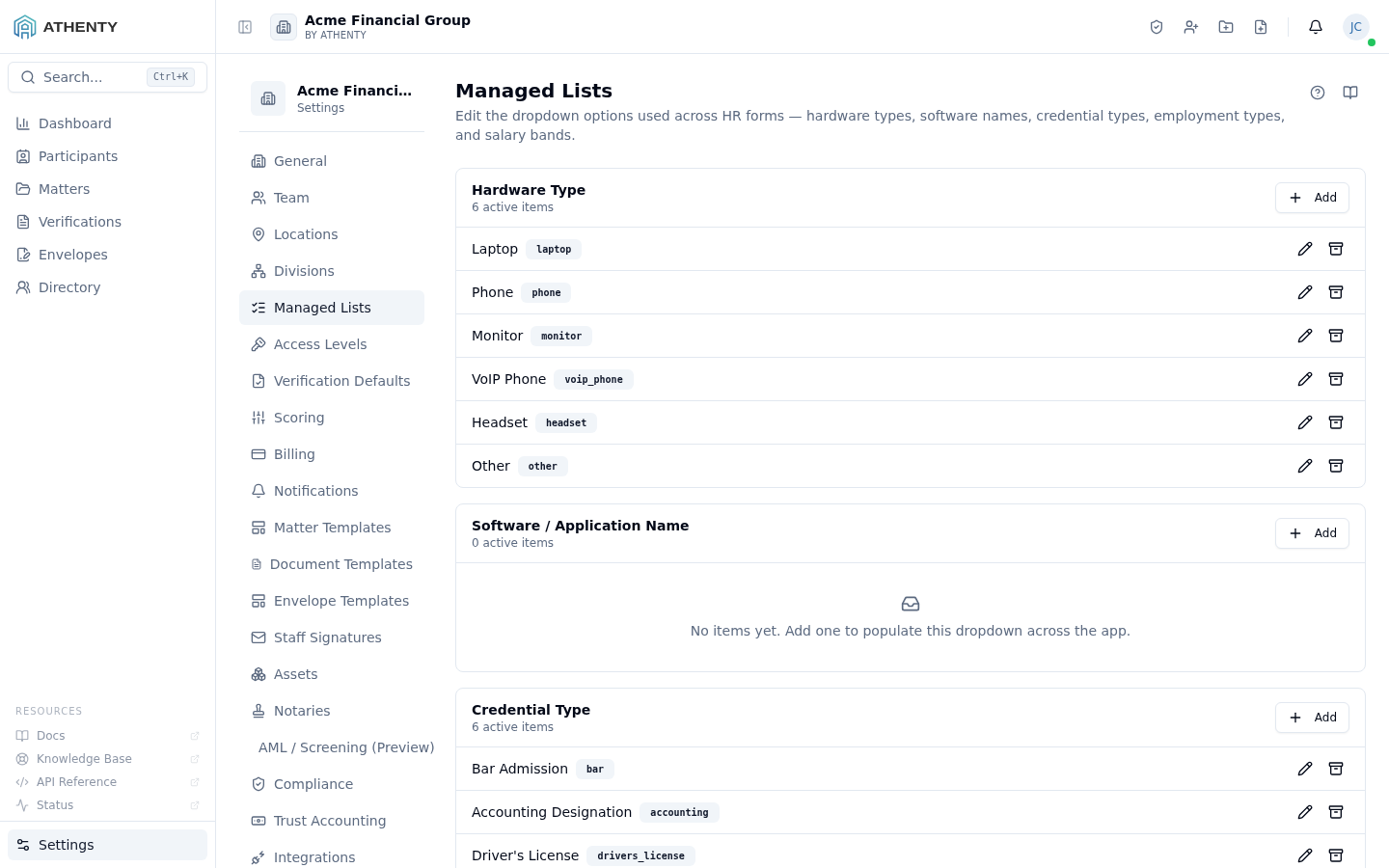
Anatomy of the page
Section titled “Anatomy of the page”1. Page header
Section titled “1. Page header”PageHeader with the title Managed Lists and a one-line description.
2. List grid
Section titled “2. List grid”A vertical stack of cards, one per managed-list type. Each card contains:
- The list label (e.g., “Employment Types”)
- Every value as a row with reorder grip, label, slug, and row actions
- An inline + Add value button
3. Per-row actions
Section titled “3. Per-row actions”- Edit — opens an inline editor for the label
- Toggle active — archive without deleting
- Drag-handle — reorder values
There is no hard-delete on values; only archive.
List types
Section titled “List types”The platform ships with a fixed set of managed-list types. New list types require a release; new values within an existing type are configurable here.
| List type | Surface that consumes it |
|---|---|
hardware_type | Settings ▸ Assets ▸ Hardware |
software_name | Settings ▸ Assets ▸ Software (when shipped) |
credential_type | Account ▸ Credentials |
employment_type | Team profile Employment tab |
salary_band | Team profile Compensation tab |
matter_type | Matters list + matter detail |
practice_area | Matter detail metadata |
participant_role | Matter Role picker on the matter Participants tab — grouped under the Matters tab of this page |
involvement | ⛔ system-generated, read-only — the participant-involvement reference set (Matters tab) |
staff_function | ⛔ system-generated, read-only — the assigned-staff function reference set (Matters tab) |
authorized_representation | ⛔ system-generated, read-only — the entity-linking capacity set (Participants tab) |
document_category | Document upload tagging |
payment_method | Trust requisition + disbursement payment-method dropdown |
System lists: displayed, read-only, never merged
Section titled “System lists: displayed, read-only, never merged”Three list types are system-generated. They are rendered on the page —
deliberately, so the values are transparent rather than hidden — but they are
read-only: no add, no edit, no archive, no delete. The enforcement is
server-side, not a disabled control: POST /v2/managed-lists/:listType
rejects these types, and they hold no rows in managed_list_items at all.
The API synthesizes them from their canonical sources, so there is no second
copy of the data that can drift.
| List | Tab | Canonical source | Values |
|---|---|---|---|
| Involvement | Matters | PARTICIPANT_TYPES + the Assigned-Staff axis | Client · Counterparty · Third-party · Assigned Staff |
| Staff Function | Matters | MATTER_INVOLVEMENTS | Matter Introducing · Matter Responsible · Matter Assigned |
| Authorized Representation | Participants | the global authorized_rep_roles table | Director, Officer, Shareholder, Partner, Trustee, Authorized Signatory, Beneficial Owner, Managing Partner, Executor/Estate Trustee, Attorney (POA), Beneficiary, Authorized Representative |
Why Involvement and Staff Function are two lists, not one
Section titled “Why Involvement and Staff Function are two lists, not one”They answer different questions and are shown side by side, never combined:
- Involvement classifies an outside participant — client, counterparty or third party. Assigned Staff is reserved to users of your own Organization; a matter participant can never carry it (staff are recorded on the matter’s staff roster, not its participant roster).
- Staff Function is reserved to Assigned Staff only. These values drive
fee-credit attribution (
matter_staff.involvement_credits), which is why the vocabulary is fixed rather than firm-editable — changing it would move revenue attribution.
Authorized Representation
Section titled “Authorized Representation”Formerly labelled Authorized Roles. Renamed so it is not confused with
Roles: a Role is matter-specific and firm-editable; an Authorized
Representation is the fixed capacity in which an individual acts for an entity
and carries legal authority. Only the user-facing label changed — the
authorized_role field, its API paths and every stored value are unchanged.
The entity-linking dialog now reads: “Link the entity this participant acts for, and the nature of their representation within it.” The existing entity rules are unchanged — an entity participant still requires at least one linked individual and at least one primary contact.
Payment methods: banking-details flag and system rows
Section titled “Payment methods: banking-details flag and system rows”The payment_method list carries two extra attributes beyond label and
slug:
requiresBankingDetails— whentrue, choosing this method on a trust requisition or disbursement forces the operator to capture banking details (a saved banking method on the payee, or freeform banking details) before the requisition can be submitted. This replaces the legacy hardcoded “anything but Cheque needs details” rule.isSystem— the 14 payment methods Athenty seeds on tenant creation are flagged as system rows. System rows are locked: theirrequiresBankingDetailsflag cannot be toggled and they cannot be archived (the API rejects both with aMANAGED_LIST_ITEM_LOCKEDerror). Their label may still be edited. Tenant-added payment methods are fully editable, including the flag.
Seed defaults — required: account_to_account_transfer, credit_card,
credit_transfer, debit_card, direct_deposit,
electronic_funds_transfer, email_money_transfer, wire. Not
required: bank_draft, cash, certified_cheque, cheque,
money_order, other.
The banking-method form adapts to the chosen method: credit/debit card capture a card number + expiry, credit transfer captures a transfer note, and for these families an account number is not mandatory. Wire and EFT continue to require an account number and beneficiary name. The beneficiary name defaults to the payee/participant name; an override requires a short reason that is stored on the audit trail.
Matter Roles: roles lock on use
Section titled “Matter Roles: roles lock on use”The participant_role list (shown as Roles under the Matters
tab) is the Matter Role picker — the role a Client, Counterparty, or
Third-party plays on a matter (Buyer, Seller, Lender, Borrower, Executor,
…). It’s fully firm-editable: no role is locked by name. A role only
locks once your firm uses the module that relies on its exact name.
- Open your firm’s first Loan matter → Borrower, Guarantor, Lender lock (loan capacity is derived from the role name).
- Open your firm’s first Estate matter → the estate roles lock: Executor, Beneficiary, Witness, Estate Trustee, Administrator, Trustee, Successor Trustee, Attorney for Property, Attorney for Personal Care, Guardian, Settlor.
A locked Matter Role cannot be renamed or archived — the affordances
are disabled in the UI and the API rejects the change with
MANAGED_LIST_ITEM_LOCKED. The lock is per-org and stored (the row’s
isSystem flag), set on first module use; it adopts a same-named role
you already have (case-insensitively, no duplicate) and creates any
missing essential role. An org that never uses those modules keeps all of
these roles editable, and every org may always add custom roles and
edit/delete the roles it added itself.
Power of Attorney is not locked — the estate engine matches Attorney for Property / Attorney for Personal Care instead — so it stays editable.
See Roles & participation taxonomy for the full picture of how Matter Role fits alongside the other four role axes (Involvement, Staff Function, Authorized-rep role, Access Level).
Slug stability
Section titled “Slug stability”Each value has a label (display text) and a slug (stable identifier). Labels can be edited freely; slugs are immutable post-save. This design preserves referential integrity: existing records reference values by slug, so renaming a label doesn’t break them.
To change a slug, add a new value with the desired slug, archive the old, and (optionally) bulk-reassign existing records.
Archive semantics
Section titled “Archive semantics”| State | Behaviour |
|---|---|
| Active | Available in dropdown pickers |
| Archived | Hidden from new pickers, preserved on existing records |
The platform exposes no hard-delete on managed-list values. Archive is the safe default: it preserves audit history and lets admins re-activate without losing data.
Permissions and scope
Section titled “Permissions and scope”| Role | View | Manage |
|---|---|---|
| Owner / Admin | ✓ | ✓ |
| Member | Indirect (uses values in forms) | ✗ |
| Viewer | Indirect | ✗ |
Audit logging
Section titled “Audit logging”| Action | Event |
|---|---|
| Create value | managed_list.value_created |
| Update value | managed_list.value_updated |
| Reorder values | managed_list.values_reordered |
| Archive | managed_list.value_archived |
| Reactivate | managed_list.value_reactivated |
Events surface in Settings ▸ Audit Log.
Troubleshooting
Section titled “Troubleshooting”| Symptom | Most likely cause | Fix |
|---|---|---|
| Slug uneditable | Immutable post-save | Add new value with desired slug; archive old |
| New value missing from dropdown | Form cache stale | Refresh the form |
| Archived value still on existing record | Working as designed | Reassign record before archive if cleanup is required |
| Reorder doesn’t persist | Drag-and-drop dispatch missed | Re-drag; watch for the saved toast |
| List empty | Seed didn’t run | Contact support |
Related pages
Section titled “Related pages”- Settings ▸ Assets — consumes hardware/software types
- Account ▸ Credentials — consumes credential types
- Settings ▸ Team — consumes employment + salary band types
- Settings ▸ Audit Log —
managed_list.*events