
Settings — AML / Sanctions Screening
The Settings ▸ Screening page configures the platform’s automated anti-money-laundering screening pipeline. When enabled, every verification subject is screened against the configured sanctions and risk lists, and any matches surface on the verification detail page for reviewer triage.
The platform’s design principle: findings are informational, decisions are human. AML hits never auto-reject a verification; the reporting entity retains the compliance decision and the audit trail captures both the hit and the human decision.
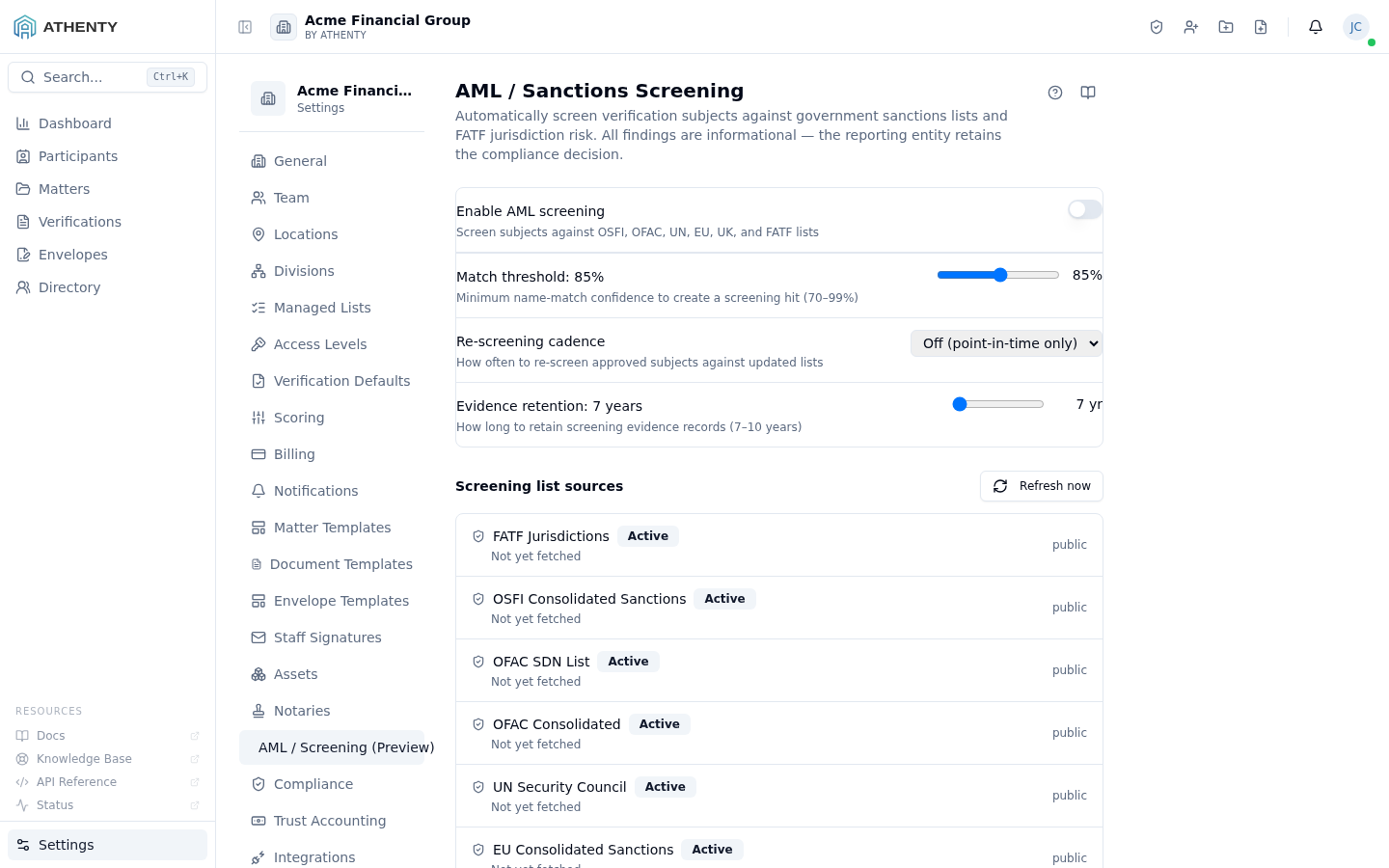
Anatomy of the page
Section titled “Anatomy of the page”1. Page header
Section titled “1. Page header”Standard PageHeader with the title AML / Sanctions Screening and a multi-line description summarizing the lists screened.
2. Settings panel
Section titled “2. Settings panel”A bordered card with four field rows:
| Field | Control | Saved on |
|---|---|---|
| Enable AML screening | Switch | Toggle change |
| Match threshold | Range slider (70–99) | Mouse-up / touch-end |
| Retention years | Number input (7–10) | Blur |
| Screening list sources | Per-list toggles + timestamps | Toggle change |
3. FATF high-risk jurisdictions
Section titled “3. FATF high-risk jurisdictions”A dedicated card showing which FATF list version is currently in force, when it was last updated, how many jurisdictions it covers, and a Check for updates button. See FATF list currency below — this card exists so the age of the data is visible rather than silent.
4. Sources section
Section titled “4. Sources section”A nested section header (Screening list sources) followed by one row per list. Each row carries a description, an on/off toggle, a “last refreshed” timestamp, and a Refresh now button.
Lists screened
Section titled “Lists screened”| List | Authority | Coverage |
|---|---|---|
| Consolidated Canadian Autonomous Sanctions List | Global Affairs Canada | Canadian autonomous sanctions (SEMA / JVCFOA) |
| OFAC SDN | US Treasury | Specially Designated Nationals |
| OFAC Consolidated (non-SDN) | US Treasury | Consolidated non-SDN lists |
| UN | United Nations Security Council | Consolidated sanctions |
| UK Sanctions List | Foreign, Commonwealth & Development Office | All UK sanctions designations (replaced the OFSI Consolidated List, closed 28 January 2026) |
| FATF | Financial Action Task Force | Jurisdiction risk (call-for-action / increased-monitoring) |
Each list’s published source URL, last-refresh time, and snapshot hash are also shown per row on the settings screen, so every screening hit traces back to the authority that published the entry.
The platform pulls from upstream sources nightly at 02:00 UTC and indexes the results into a fast in-memory matcher. The matcher uses fuzzy name matching with the configured threshold.
Match threshold mechanics
Section titled “Match threshold mechanics”The threshold is a percentage: a match score below it is suppressed, above it surfaces as a hit on the verification detail page.
- 70–80% — wide net, more false positives, useful for high transliteration risk
- 85% — calibrated default; balances signal and noise
- 90–99% — tight net, fewer false positives, may miss near-matches
The score is computed from a name-similarity algorithm tuned for multi-script inputs (Latin, Cyrillic, Arabic, CJK).
Retention
Section titled “Retention”In Canada, PCMLTFR (SOR/2002-184), s. 69 (administered by FINTRAC) — and most other regulators — require AML records to be retained for at least 5 years. Athenty floors retention at 7 years as a buffer above that minimum and accepts 7–10 years; values outside 7–10 are rejected server-side. The default is 7 years.
The retention clock starts at the verification’s completion timestamp. After expiry, AML hits are purged from the verification record but the verification itself remains.
FATF list currency
Section titled “FATF list currency”The FATF high-risk lists are not fetched like the sanctions name lists — they are versioned data reviewed and released with the platform, and the FATF high-risk jurisdictions card tells you exactly which version you are screening against.
Why FATF is handled differently
Section titled “Why FATF is handled differently”FATF publishes no machine-readable feed — the two lists exist only as HTML statements, and the FATF website rejects automated clients. Scraping them would be unreliable and unsafe: a layout change or a blocked request that parsed to “zero jurisdictions” would silently de-list every high-risk country and weaken screening for everyone, with no error to show for it. So the lists are transcribed from the FATF statement, reviewed like any other change, and released with the platform.
What the card shows
Section titled “What the card shows”| Field | Meaning |
|---|---|
| List in force | The FATF plenary whose lists you are screening against, e.g. June 2026 plenary |
| Last updated | When this version was applied to your environment |
| Coverage | How many call-for-action and increased-monitoring jurisdictions it contains |
| Published by FATF | The plenary cadence, the next expected list, and links to the citation and the FATF statement |
The currency badge
Section titled “The currency badge”FATF re-issues both lists three times a year — at the February, June and October plenaries. The badge is computed from that calendar, never from a network check, so it cannot report “current” merely because a source was unreachable:
| Badge | Meaning |
|---|---|
| Current | No plenary has concluded since this list was published |
| 1 update behind | One plenary has concluded and the newer list has not been loaded yet |
| 2+ updates behind | Two or more plenary cycles have been missed |
When the badge is not Current, the page says so in plain language and Athenty raises an operations alert. Screening keeps running against the version shown — a stale or failed update never disables or weakens screening, and never clears the list in force.
Check for updates
Section titled “Check for updates”Check for updates applies the newest list version your environment knows about, immediately. It is idempotent (safe to press repeatedly), it reports what changed — including jurisdictions FATF removed, which are cleared from screening — and if it fails, the version already in force stays in force.
The same update runs automatically as part of the nightly AML refresh.
List sources
Section titled “List sources”Each list source has a toggle and a last-refresh timestamp. Disabling a list:
- Suppresses new hits from that list immediately
- Does not purge existing hits — those remain in audit history
Manual refresh:
- Triggers an out-of-band pull from the upstream regulator
- Useful when an emergency designation is published mid-day
- Idempotent — safe to spam; the worker dedupes
Sanctions-screening override authority
Section titled “Sanctions-screening override authority”A confirmed or pending sanctions hit on a payee blocks money-out — trust disbursements and vendor payments to that payee are refused. A hit can nonetheless be one the firm is authorized to pay (counsel sign-off, a permit), so an authorized user may record an explicit, audited override rather than the system being a hard wall.
Overrides come in two scopes:
| Scope | Effect | Who may record it |
|---|---|---|
| Global | The payee becomes payable org-wide | Owner, Admin, or a holder of Compliance Management |
| Matter-scoped | Clears the block for payments on that one matter only | The same three — plus the Matter Responsible for that matter, if the setting below is on |
The setting
Section titled “The setting”Matter Responsible may override on their own matters — a single switch, off by default.
- Off (default) — only an Owner, an Admin, or a holder of Compliance Management may clear a screening block, at either scope.
- On — the Matter Responsible on a matter may additionally record a matter-scoped override on that matter, without holding the Compliance Management add-on.
The switch never widens the global scope. A matter lawyer can clear a false positive on their own file; they can never make a sanctioned payee payable everywhere. Turn it on to remove the Owner/Admin bottleneck on routine false positives; leave it off for the strictest posture.
This control is orthogonal to the trust dual-signer gate. Screening answers may we pay this payee at all; the signer gate answers is this disbursement authorized to leave trust. Clearing one does not clear the other, and this setting does not touch the signer rules.
Every override is recorded against the payment with its author, so the switch changes who may act, never whether the action is logged. Settings ▸ Permissioning shows the enforced rule as the server applies it; this page is where the setting is changed.
Permissions and scope
Section titled “Permissions and scope”| Role | View | Edit |
|---|---|---|
| Owner / Admin | ✓ | ✓ |
| Member | Indirect (sees hits on verification detail) | ✗ |
| Viewer | ✗ | ✗ |
AML configuration is tenant-wide. The one per-matter concept on this page is the matter-scoped sanctions override described above — it clears a screening block on a single matter; it does not vary the screening configuration itself.
Audit logging
Section titled “Audit logging”| Action | Event |
|---|---|
| Toggle AML | org.aml_settings_updated (diff includes enabled) |
| Threshold change | org.aml_settings_updated (diff includes match_threshold) |
| Retention change | org.aml_settings_updated (diff includes retention_years) |
| Source toggle | org.aml_settings_updated (diff includes sources) |
| Manual refresh | org.aml_refresh_triggered (with source ID) |
Troubleshooting
Section titled “Troubleshooting”| Symptom | Most likely cause | Fix |
|---|---|---|
| AML toggle stuck off | Plan tier excludes AML | Upgrade under Settings ▸ Billing |
| Threshold won’t save | Released outside 70–99 | Drag back in range |
| Last-refreshed timestamp old | Auto-refresh hasn’t run yet today | Click Refresh now |
| FATF card shows 1 update behind / 2+ updates behind | A FATF plenary has concluded and the newer list version hasn’t been loaded | Click Check for updates. If the badge doesn’t change, the newer list isn’t in this release yet — contact Athenty support. Screening keeps running against the version shown |
| FATF card shows a failed update | The last apply was refused or errored | The version already in force is unchanged and screening is unaffected; the error is on the card and in the operations alert |
| Excessive false positives | Threshold too low | Raise to 90 and observe |
| Missed obvious hit | Threshold too high or list disabled | Lower threshold or re-enable list |
Standards & authorities
Section titled “Standards & authorities”Athenty’s screening is built to the international AML framework, but the app does not name any screen after a single regulator — your reporting-entity obligations govern, and they vary by country and sector. These are the authorities the screening logic is based on, linked to the official text. Citations reviewed and approved by counsel 2026-07-12 (#577 c.64828); the Canadian and UK sanctions-list sources were re-pointed 2026-09-24 after both publishers moved them — OSFI’s mirror of the Canadian list was retired in favour of Global Affairs Canada’s, and the OFSI Consolidated List closed on 28 January 2026 in favour of the FCDO UK Sanctions List. Those two citations are attorney-review-pending. Approval covers the citations — the screening lists themselves change constantly (FATF re-issues its lists three times a year). Verify any hit against the list’s own current published source.
| What Athenty does | Governing authority |
|---|---|
| Sanctions screening (Canada, OFAC, UN, UK lists) | The published sanctions lists of each authority: Canada’s Consolidated Canadian Autonomous Sanctions List (Global Affairs Canada) under SEMA / JVCFOA; the UN Security Council consolidated list; US OFAC SDN + consolidated non-SDN; the UK Sanctions List (FCDO) under the Sanctions and Anti-Money Laundering Act 2018. A sanctions match is blocking. |
| PEP (politically-exposed person) screening + enhanced due diligence | FATF Recommendation 12 (PEPs). A PEP hit is not itself a prohibition — it signals enhanced due diligence; the reporting entity decides. |
| High-risk jurisdiction risk (FATF list) | FATF Recommendation 19 + the FATF “high-risk jurisdictions subject to a call for action” / “increased monitoring” lists. A call-for-action jurisdiction floors the verification score to manual review; increased monitoring caps it pending review. The version in force, its age, and its currency badge are shown on the settings page — see FATF list currency. |
| Record retention | PCMLTFR (SOR/2002-184), s. 69 (Canada) and most regulators require AML records be kept at least 5 years. Athenty floors retention at 7 years (configurable 7–10) as a buffer. |
| The reporting-entity decision | Athenty’s findings are informational — under FATF R.1 / the PCMLTFA the reporting entity makes and records the risk decision (in Canada, overseen by FINTRAC). |
Related pages
Section titled “Related pages”- Verifications — surface where AML hits appear on the detail page
- Settings ▸ Regulator Reports — the trust reports a regulator asks for
- Settings ▸ Permissioning — the enforced sanctions-override rule
- Settings ▸ Audit Log —
org.aml_*events - Settings ▸ Billing — tier gates AML availability